

- PWA
- mobile app
- architecture
- mobile-first
Mobile app or PWA: two questions that settle it
An app in the stores reassures boards. Yet two questions settle it, and hardware decides first.
The request usually arrives pre-formulated: “we want a mobile app.” Behind that sentence there is almost always a legitimate goal — being on the customer's phone, sending notifications, not depending on a browser. But the route chosen has consequences few quotes spell out.
What we are comparing
A native app is built for Android and for iOS, published to the Play Store and the App Store, installed from those stores.
A PWA — Progressive Web App — is a web application built to install on the home screen, work offline and receive notifications. It opens full screen, with no address bar: to the user, the difference from an installed app is not obvious.
What actually differs
| Criterion | Native app | PWA |
|---|---|---|
| Initial cost | Two codebases to write and maintain | One, shared with the web |
| Install | Through the store, tens of megabytes | One tap on “Add to home screen” |
| Updates | Publish, store review, then wait for users to update | Immediate, on next load |
| Offline | Full | Full for whatever was cached |
| Notifications | Android and iOS | Android for years, iOS since 16.4, if installed |
| Camera, location, files | Full access | Main sensors, with limits |
| Bluetooth, NFC, permanent background | Full access | Partial or unavailable |
| Findable on Google | No, only in the store | Yes, it is a web app |
Two questions are enough
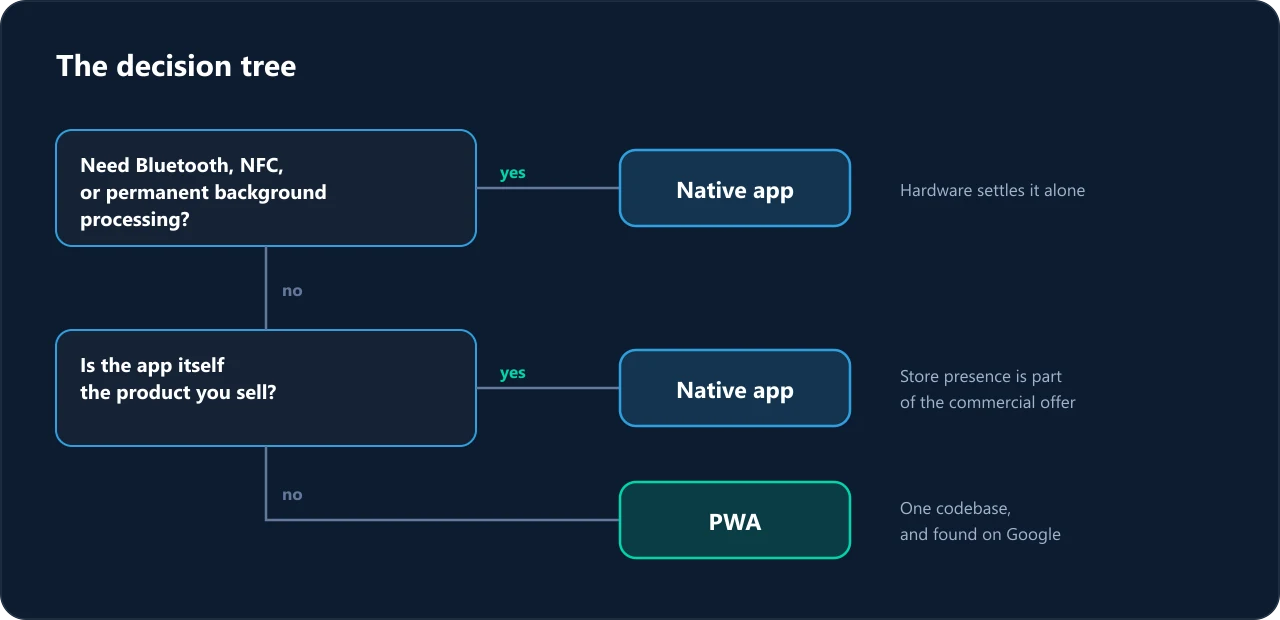
Do you need hardware the web cannot reach?
Bluetooth, NFC, permanent background processing: badge readers, payment terminals, fleet tracking, sensor pairing. If the answer is yes, the question is closed — native it is, and the rest of this article does not concern you.
Is the app the product you sell?
If your users search for your name in the store, if store presence is part of the commercial pitch, or if you charge for the app itself, native remains the right call.
In every other case — a client area, order tracking, a catalogue, booking, an internal tool — a PWA covers the real need for a fraction of the budget, and stays findable on Google, which a native app never will be.
Network constraints weigh more than comparisons admit
Two realities most comparisons skip, and that apply anywhere connectivity is not guaranteed — field teams, industrial sites, rural areas, emerging markets:
- Download weight. A forty-megabyte app is a real expense on a capped data plan, and an outright abandonment on a slow connection. A PWA loads progressively, in a few hundred kilobytes.
- Available storage. On a full entry-level phone, installing your app means uninstalling another. The question is not whether yours is useful, but whether it is more useful than whatever would have to go.
Offline design decides usability on an unstable connection, not the chosen technology. A native app that assumes the network is as unusable as a website.
A third route, often the right one
Start with a PWA, measure real usage for a few months, then decide. You will know which features are used, how often, and on which devices — three things nobody has before launch. The work is not lost: the interface and the server stay, only the shell changes.
The Web & Mobile Development page details both approaches. If you are still hesitating, describe the intended use: the answer usually fits in one conversation.

ROCH Technologie
We design and build web, mobile and business platforms for companies that want a technical partner, not an order-taker.
Read next
Selling into West Africa: what your platform must handle
A platform designed for Europe fails on three precise points in West Africa. None are technical: they are contractual decisions.
6 min readGDPR: what your site collects without you knowing
A contact form, an analytics tag and a share button are enough to trigger obligations. The whole question, in plain terms.
5 min readWebsite rebuild: refactor or start over?
Refactoring costs less up to a point, beyond which the opposite is true. Two questions place your site relative to that point.
5 min read